For engineering offices that run on documents

It stops you sending
something wrong.
And it proves you were right.

The workspace reads your contract, specifications, drawings and years of correspondence — then checks what you are about to issue against them, and keeps the record that protects you when the answer is slow. Registers, drawings, workflows and claims around it, on infrastructure you own. Built inside the delivery of a mega-project, not in a demo lab.

72,000+
Ask your archive
documents indexed on one live project — every answer cites its exact page
35
Engineering calculators
pumps to gensets to lifts — the formula printed with every result
5,300
Sign-offs, proven
EDL rows moving through real chains — 14 engineers in parallel, reconciled
100%
Yours
your hardware, one workspace price — no per-seat cloud, no data leaving
EN+AR
Reads everything
scanned letters and stamped drawings, searchable in both languages
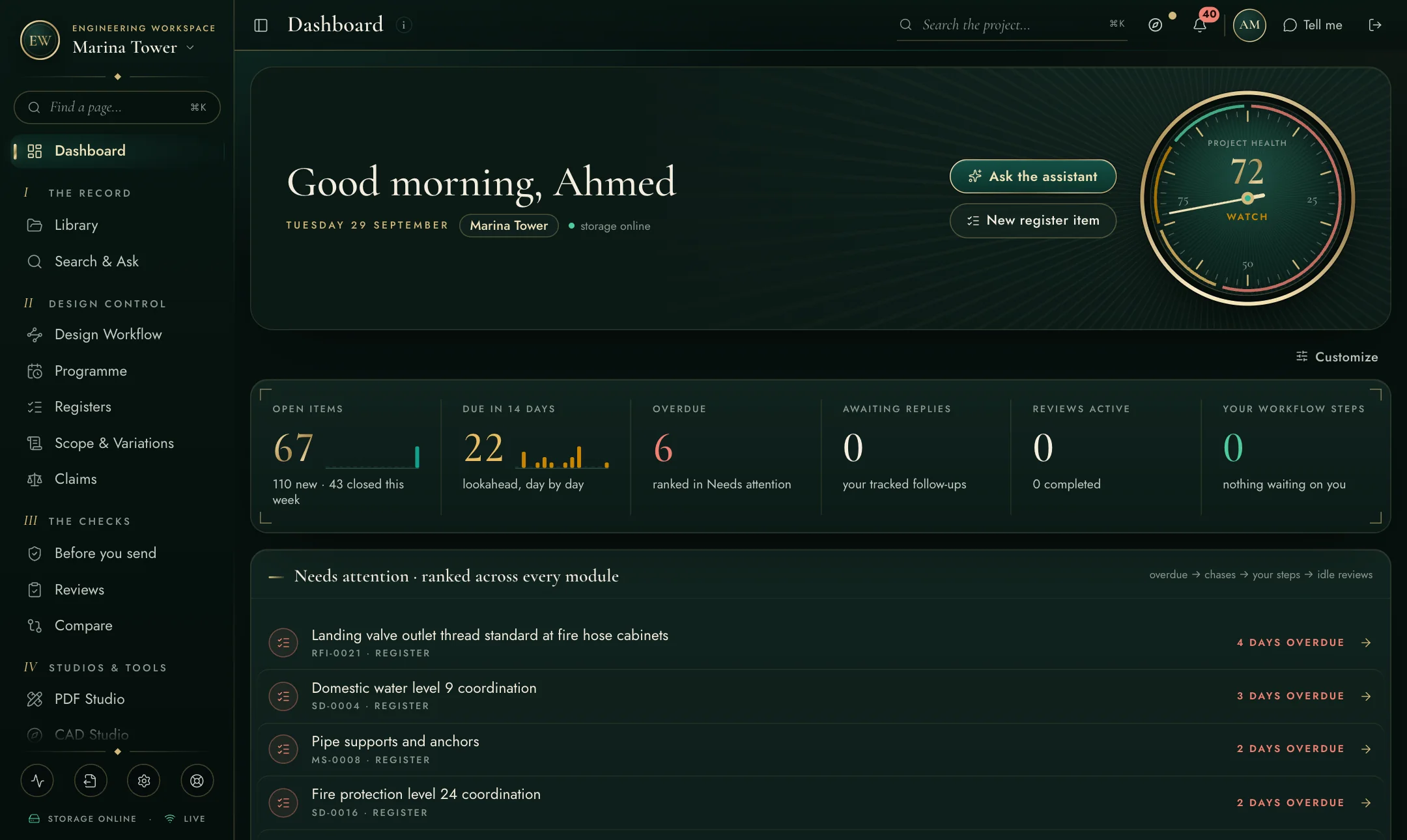
engineering-workspace — your project's front page
The dashboard
The check that runs before anything leaves

Your own documents already know
what is wrong with that letter.

An RFI, a letter, a submittal cover, a claim notice. Paste it in and the workspace retrieves the clauses it relies on — the whole section, not the sentence somebody remembered — and answers six questions before the Engineer gets the chance to.

01

Do the clauses say what you claim?

Every specification section, drawing and code the draft leans on is retrieved and read. A quotation that does not survive its own source is found here, not in the response.

02

Is there a clause that contradicts you?

The one nobody thinks to look for: a requirement elsewhere in the same section that forbids exactly what you are proposing. A draft claiming compliance while breaching an unmentioned clause is worse than one that asks openly.

03

Is that the edition your contract binds?

A standing register of every code the contract binds, at which edition, against which edition is actually on your shelf. A section number taken from a later edition is a rejection that looks like a technicality and costs a full cycle.

04

Are you deviating without saying so?

Undeclared deviations are what turn a technical discussion into a credibility problem. Declared ones get approved. The check names each one and drafts the sentence that declares it.

05

Have you made a claim one example destroys?

"No longer available anywhere" invites a reviewer to spend ten minutes disproving you, and then to read the rest of your submission with suspicion. It is replaced with what was surveyed, when, and by whom.

06

Is there a required response date?

Without one, a six-week silence leaves no position worth arguing. The check refuses to call a draft ready until it says when an answer is needed and what that answer protects.

Your draft
RFI · letter · submittal cover
claim notice · method statement
Read against your own archive
clauses retrieved and read whole —
editions, conflicts, acceptable makers,
and what this Engineer ruled before
Hold · revise · send
with the clause that contradicts you
quoted, and where it sits
See everything the check reads →
One workspace, not seven apps

Everything the office does. Choose a pillar — see it real.

These are actual screens, not mock-ups. Every pillar has its own deep-dive page with more screenshots and detail.

Dashboard
Your radar

Dashboard

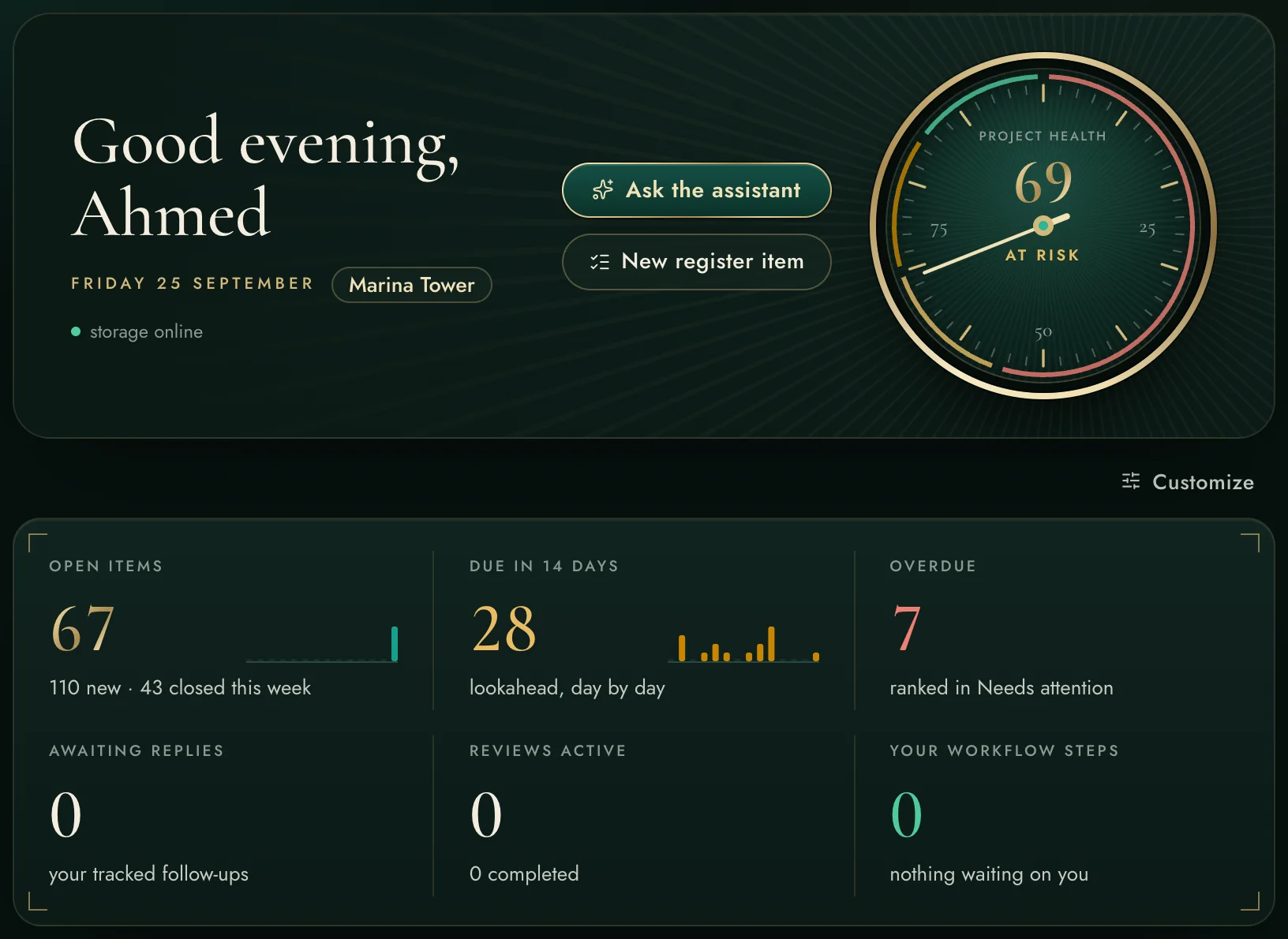
A project-health score you can interrogate, an AI morning brief, and one “Needs attention” list ranked across registers, workflows, reviews and mail.

Every overdue thing in the project, one ranked list
KPI tiles with real day-by-day sparklines
Click any row — you land on the item itself
Explore Dashboard in depth →
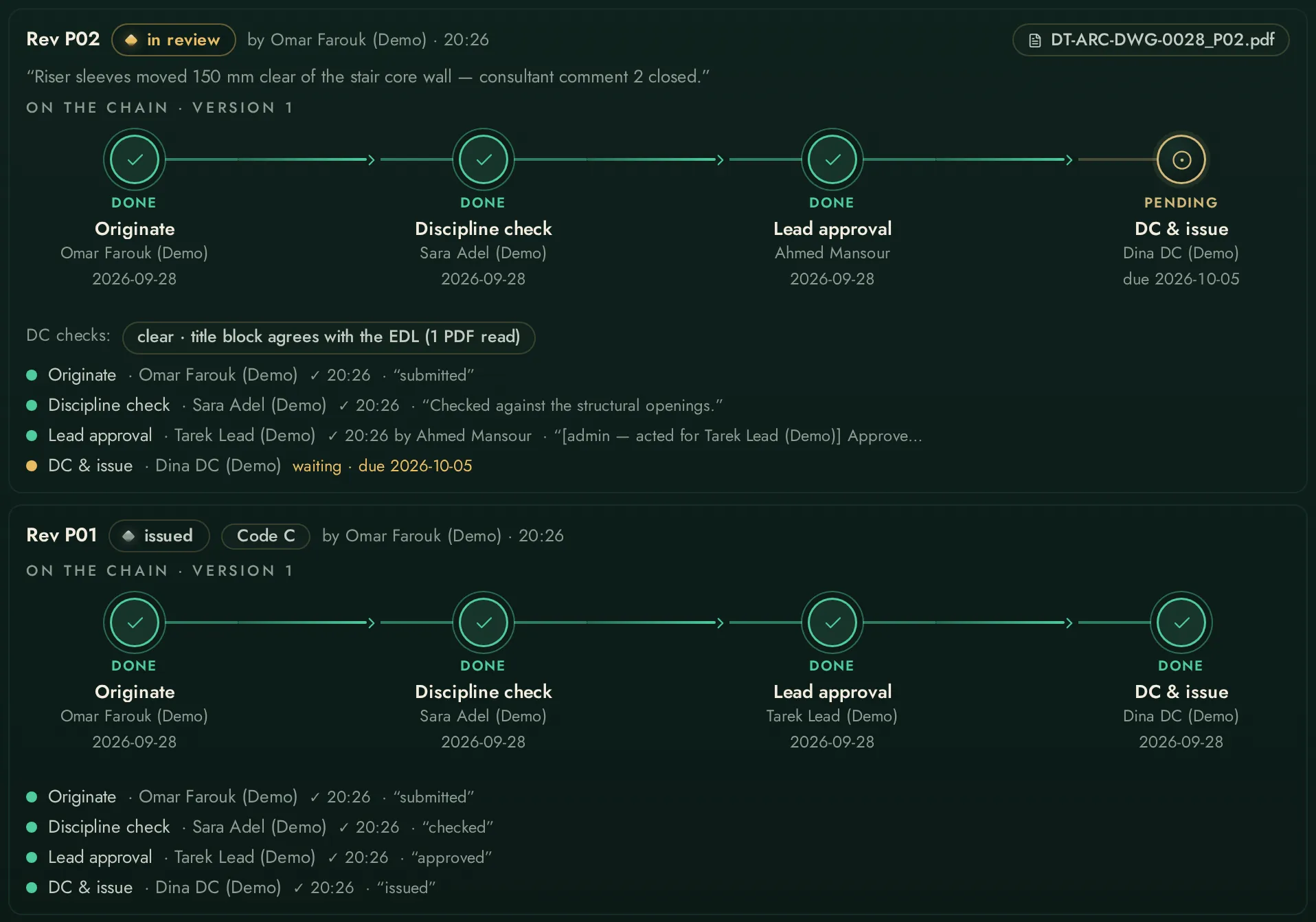
Design Workflow
The EDL, alive

Design Workflow

Deliverables move through real sign-off chains — originate, check, approve, DC, issue — with working-day deadlines, escalation, response codes and as-builts.

Proven at 5,300 rows and 14 engineers acting in parallel
Batch approvals, delegation for leave, automatic escalation
Consultant response codes close the loop — C/D reopen the chain themselves
Explore Design Workflow in depth →
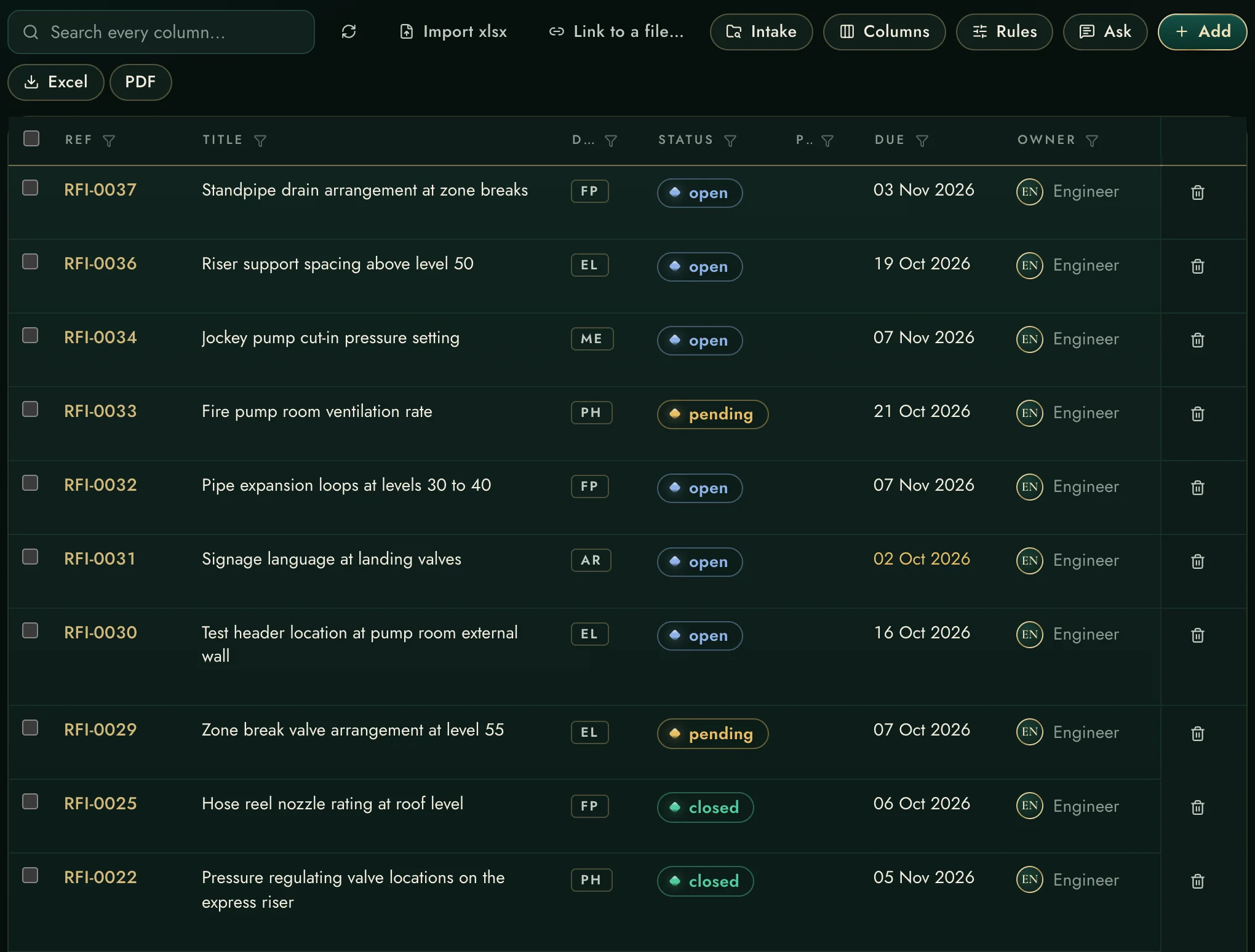
Registers
The approval clock

Registers

RFIs, submittals, shop drawings, risks — one consistent grid that imports your existing exports and shows who is holding what, oldest first.

Import the Aconex export you already have — columns map themselves
Excel and PDF out, chase packs in one press
Feeds the claims ledger automatically
Explore Registers in depth →
Claims
Evidence on autopilot

Claims

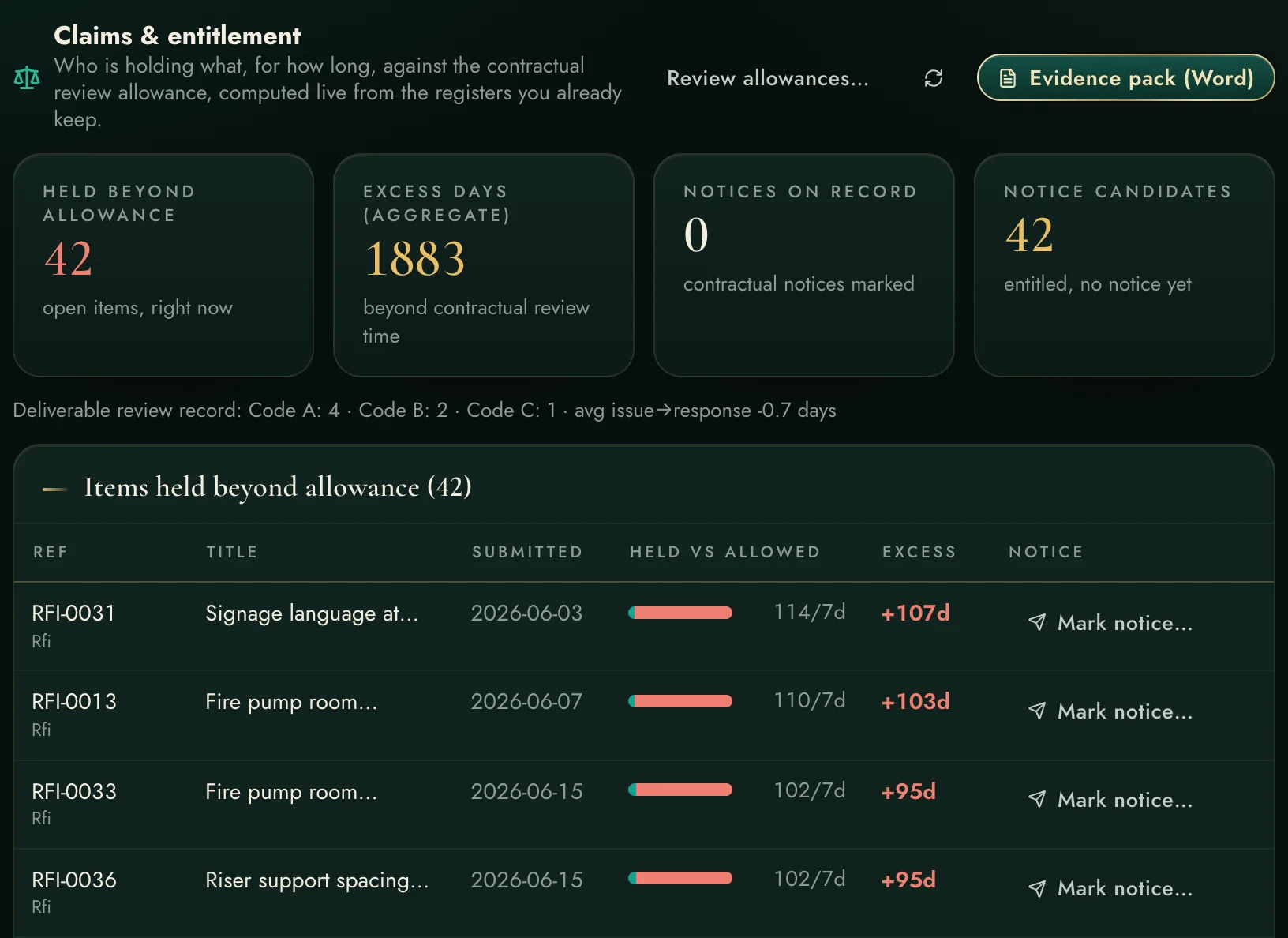
Every day a submittal sits beyond its contractual review allowance is recorded as entitlement evidence — and the monthly exhibit is one press away.

Held-vs-allowed clocks on every open item
Notice deadlines tracked — never miss a 28-day clause
Word evidence pack with dates and references
Explore Claims in depth →
Search & Ask
Page-cited answers

Search & Ask

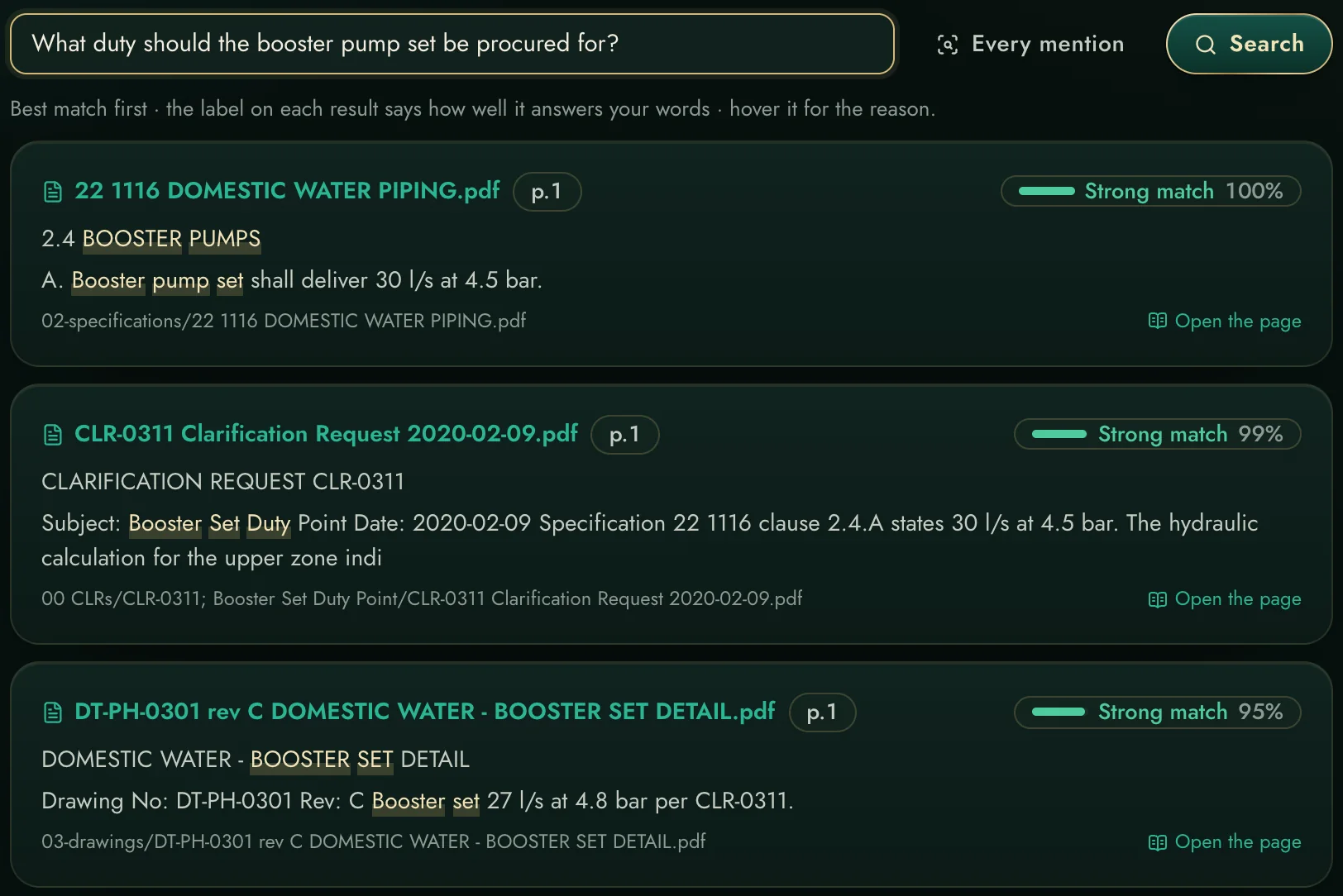
Ask across every indexed document — specifications, drawings, letters, even scans — and get answers that cite the exact page.

Semantic + keyword search with reranking, on your own server
Arabic and English, scanned documents included
⌘K palette from anywhere in the app
Explore Search & Ask in depth →
Mail & Follow-ups
Nothing slips

Mail & Follow-ups

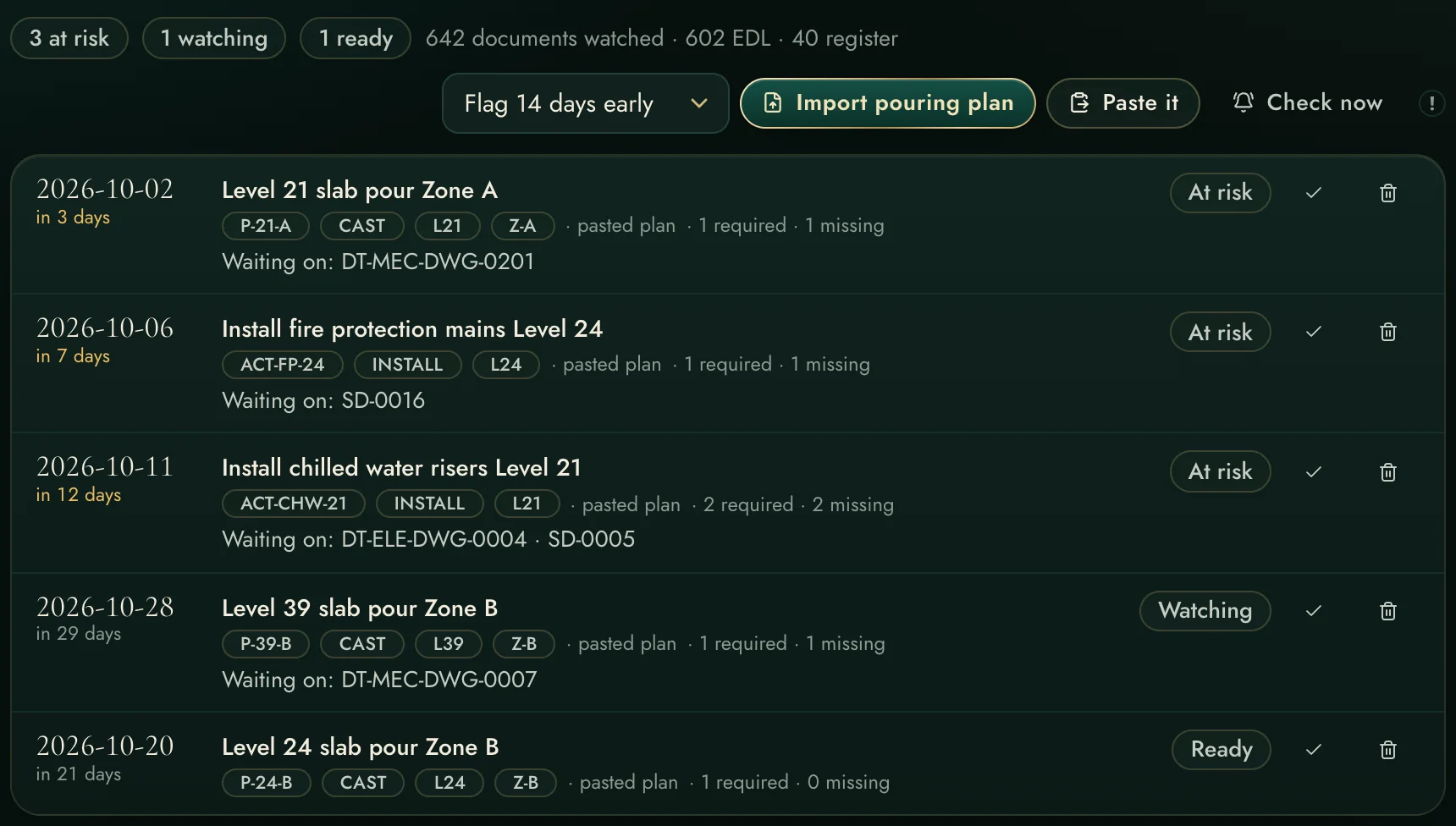
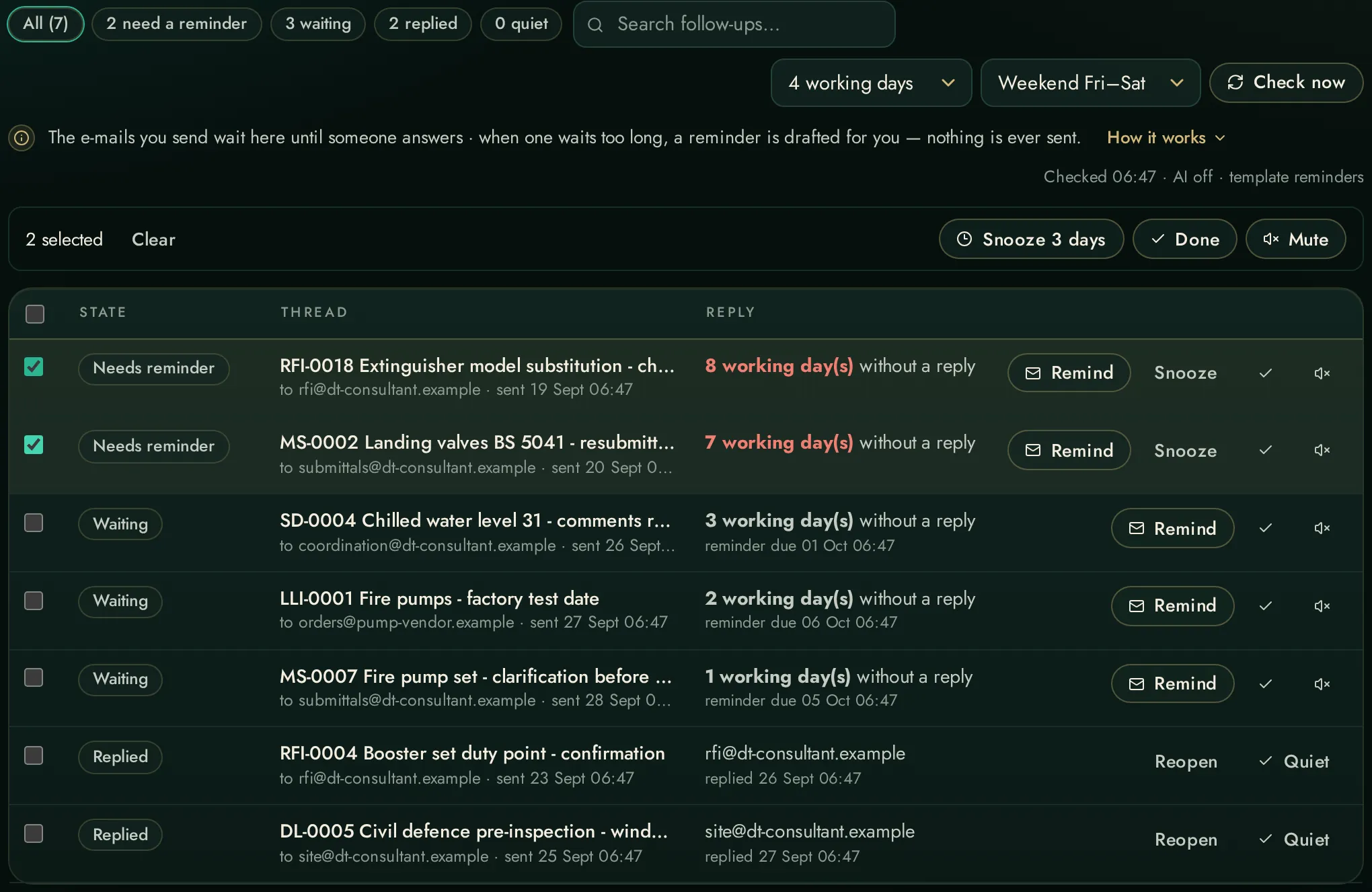
Your sent mail becomes tracked promises: replies detected automatically, chasers drafted, working days counted on your weekend.

Meeting prep packs assembled from mail, calendar and registers
Reads and drafts only — it never sends anything itself
Connect YOUR account; sign-in happens at microsoft.com
Explore Mail & Follow-ups in depth →
Studios
Drawings in the browser

Studios

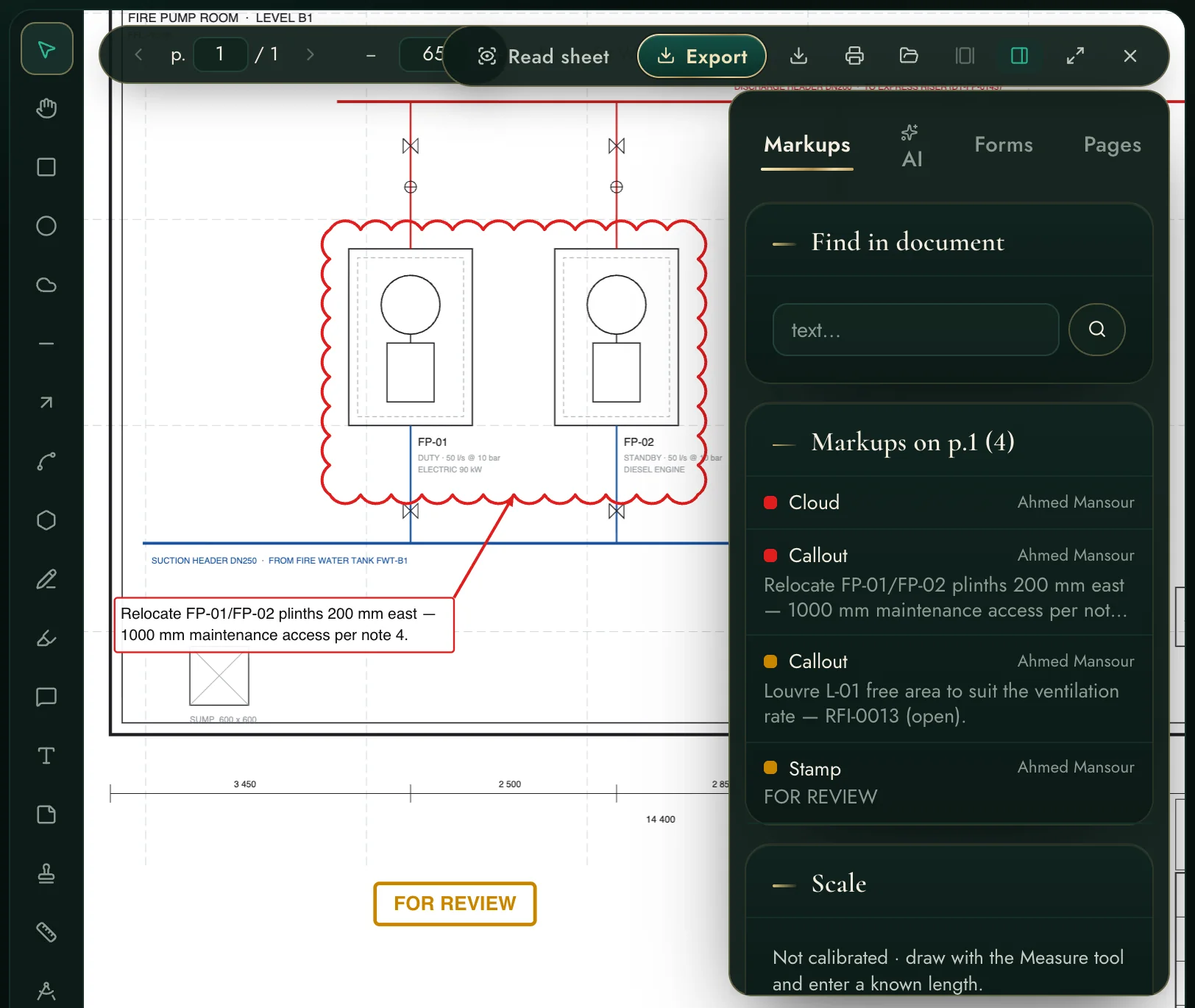
Mark up PDF drawings — clouds, callouts, stamps, RFI-linked comments — open DWG/DXF directly, and compare two revisions with every change highlighted.

A real review, live: cloud, callouts and a FOR REVIEW stamp on the sheet
Open from the project, OneDrive, mail attachments or your PC
Exports look exactly as you drew them
Explore Studios in depth →
Calculators
35 verified tools

Calculators

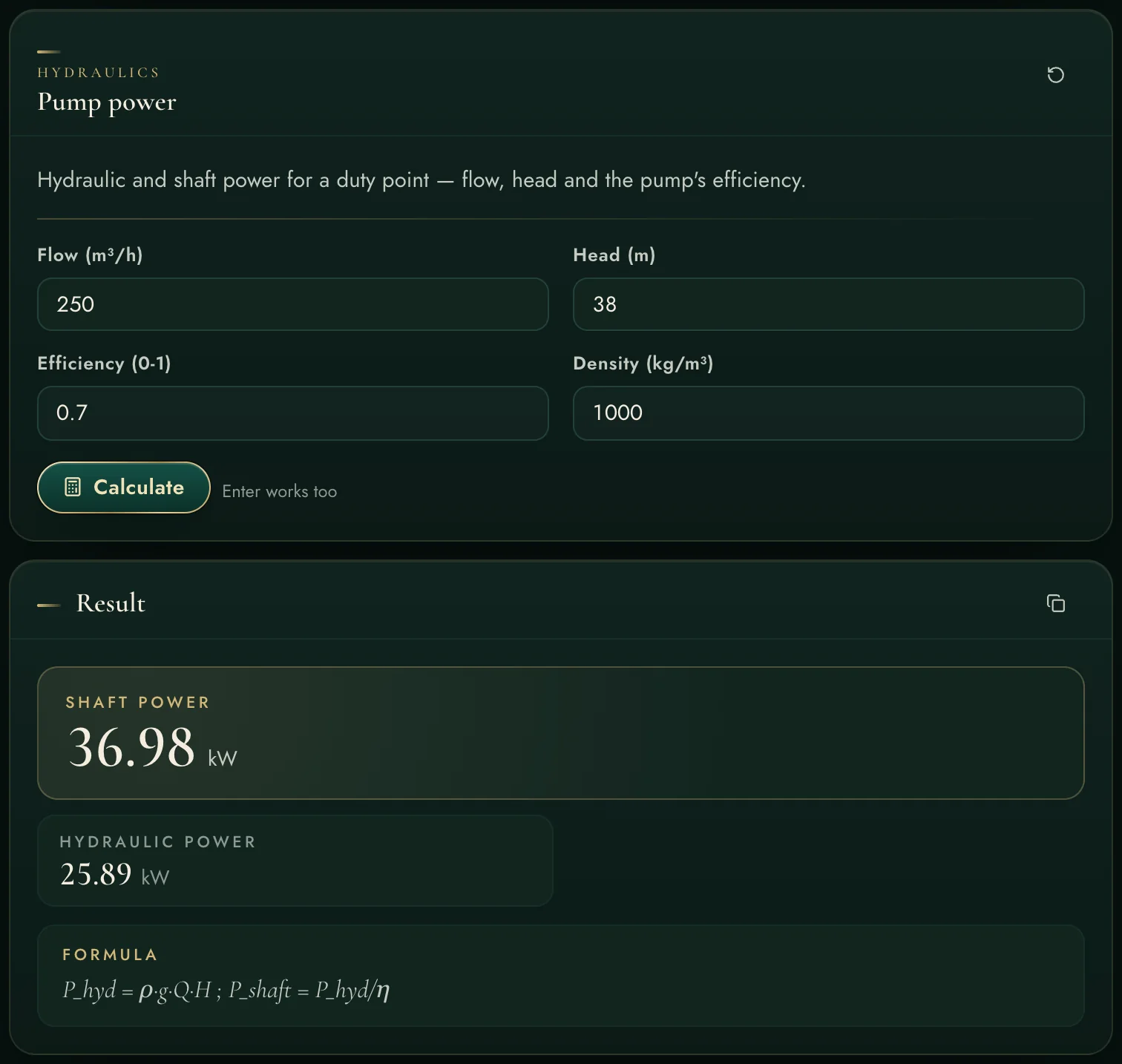
Thirty-five engineering calculators — hydraulics, HVAC, electrical, fire, drainage, plumbing, vertical transport — each showing its formula and its assumptions with the result.

Pump power to genset sizing to lift traffic — in the workspace, not a spreadsheet
Every result carries the formula it used
The Assistant uses the same calculators in documents
Explore Calculators in depth →
Assistant & AI
Grounded, honest

Assistant & AI

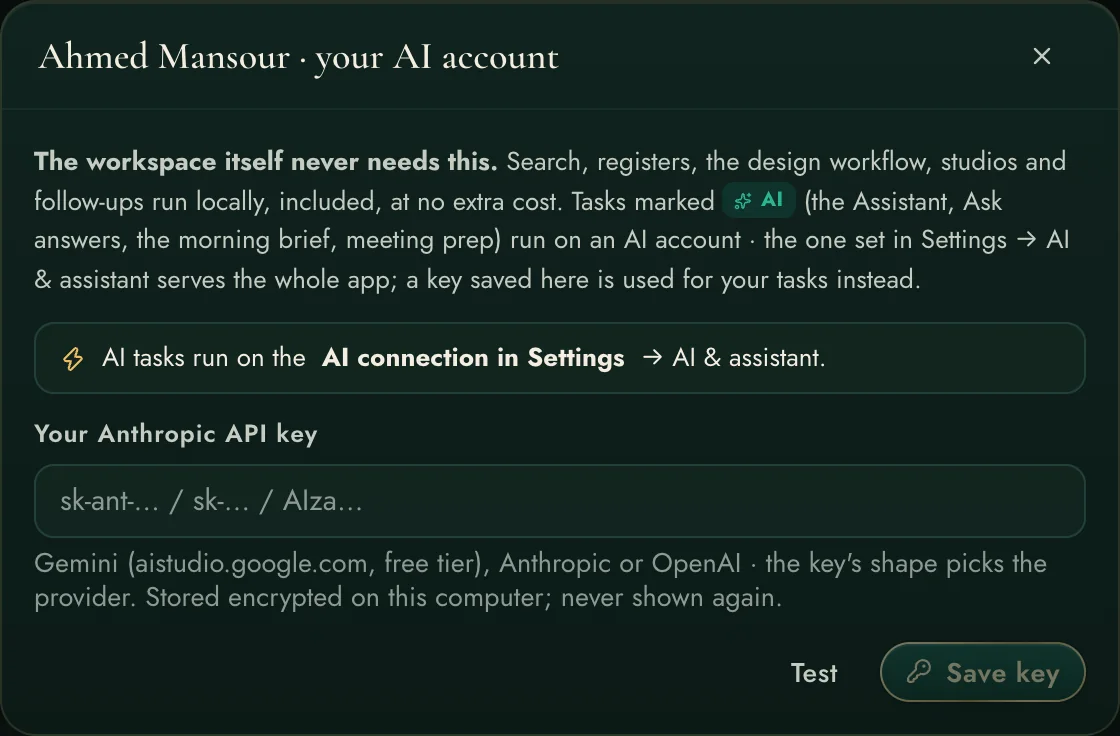
A project-grounded assistant that searches your evidence, calculates with verified formulas and writes deliverables on your letterhead — with per-user AI accounts, badged and billed honestly.

Cites (document, p.X) — or says ⟨TBC⟩, never invents
Keeps your company template's cover, footer and contents
Each user brings their own AI key; local features never need one
Explore Assistant & AI in depth →
Platform
The operating system

Platform

Programme, variations, AI document reviews, multi-project workspaces, client portal, security, backups, automations — the frame that makes the pillars one product.

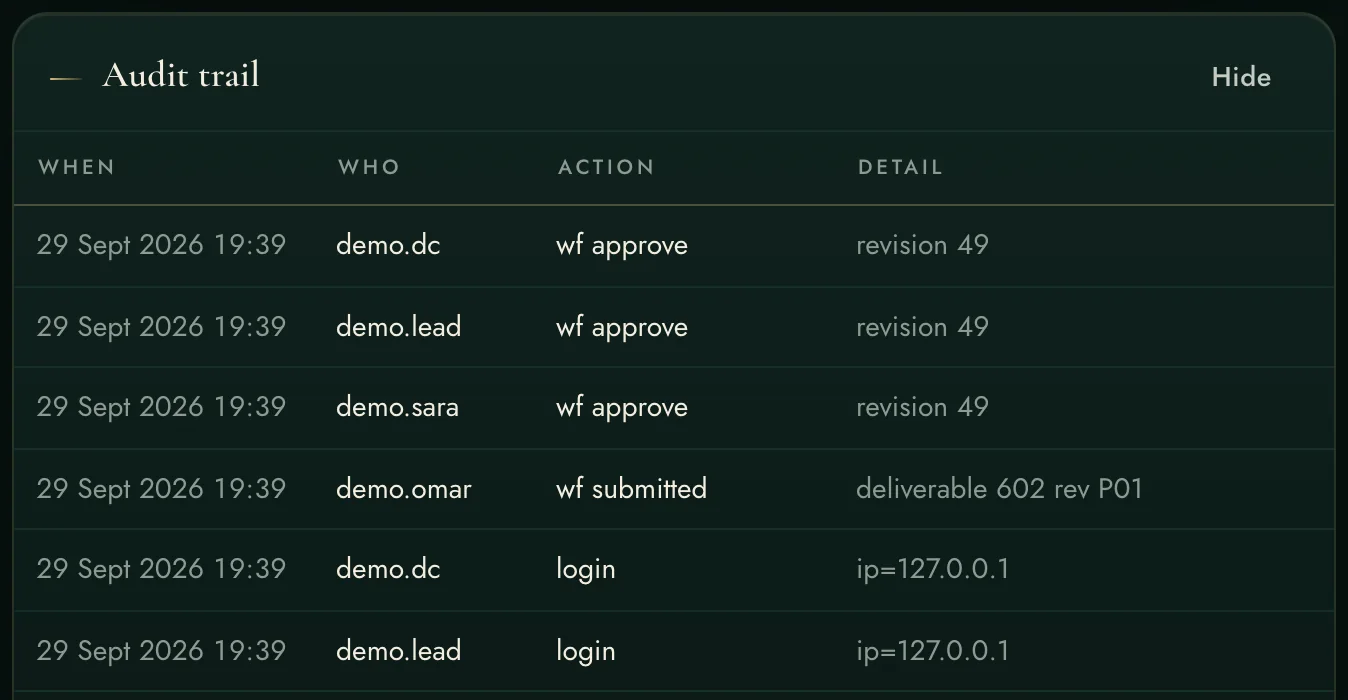
Roles, 2FA, audit trail, signed updates, encrypted secrets
Hourly automations chase so people don't have to
Teaches itself: tour, manual, living demo project
Explore Platform in depth →
Ninety seconds, one project morning

Watch it work.

No slides, no narrator, nothing staged — the real product moving through a real morning: the brief, a question to the archive, the deliverable list, a workflow chain, a claim, a drawing marked up, a calculation, the inbox.

00:05 the morning brief 00:18 ask the archive 00:32 the deliverable list 00:45 a workflow chain 00:56 claims with citations 01:05 PDF studio 01:18 calculators 01:28 mail & calendar
What this means for your company

Six commitments. One workspace.

Not features for a brochure — outcomes a delivery director signs their name against.

01

Control the design workflow — and the process itself

Design, review and approval chains with named owners and working-day clocks — and the process monitored end to end, so a defect in the flow (a step sat on, a chain skipped, a code unrecorded) is seen and fixed, never suffered silently.

02

One complete workspace. Productive engineers.

Drawings, registers, mail, calculators, search and AI in one place, one login, one record. The hours your engineers lose switching, exporting and re-finding come back as engineering.

03

Track the scope. Eliminate scope creep.

The scope of work tracked item by item, every variation registered the day it appears, and consultant comments screened automatically for hidden scope — creep is caught while it is still a sentence, not a cost.

04

Discover claims — with proper citations

The claims ledger builds entitlement evidence from the registers you already keep: held-vs-allowed clocks, notice windows, excess days — and every exhibit cites its documents, dates and references.

05

The speed of indexing, the power of AI

72,000+ documents indexed locally answer in seconds with the page cited — and AI composes, drafts and reviews on top of that evidence. Intelligence with receipts, at zero cost per question.

06

The complete platform

Schedule control, variations, email, calendar and notifications — with registers, drawings, workflows and claims — one platform on your own hardware. No module gaps, no second subscription.

The part nobody else explains

Your documents already know the answers.
Indexing is how you ask them.

Most engineering offices sit on tens of thousands of PDFs, drawings and letters that only answer when someone remembers where to look. The workspace reads them all — once — and turns them into a knowledge base that answers in seconds, with the page number to prove it.

Your folders
specs · drawings · letters
scans · registers · minutes
The EW intelligence engine
reads, OCRs (English + Arabic),
understands and indexes — on your machine
Cited answers
“…as clause 4.3.2 requires —
(Spec 22 60 00, p.41)

What that looks like in real work

One question — “chilled water riser insulation thickness” — and the workspace lines up the specification clause, the consultant's reply, the drawing legend and the condensation calculation. Four documents, four page numbers, three seconds.

No per-question cost — the engine runs on your own server
Scans and Arabic letters are read, not skipped
New arrivals index themselves from watched folders
Explore Search & Ask in depth →
Search results with page citations
Say it plainly

What we have. What the others are missing.

Measured against the engineering software an office actually buys: the per-seat markup application, and the per-user construction cloud. They are good tools. They are also islands — and the work lives in the gaps between them.

Engineering Workspace The markup suiteThe construction cloud
Checks what you are about to SEND against the specification it cites
Finds the clause elsewhere in the same section that contradicts your proposalreads the whole section
Standing register: which code editions the contract binds vs what is on the shelf
Requirements inside one specification that cannot both be satisfied, found automatically
“Has the Engineer ruled on this before?” answered from your own correspondencekeyword search only
A site photograph checked against the APPROVED SUBMITTAL, not a generic checklistchecklist inspections
Speak a snag on site and it files itself as the right kind of recordon-device, no AI accounttyped forms
Head-office view across every job: turnaround, return reasons, repeat conflictsdashboards, not causes
How long this project actually takes to answer, measured from your own recordreports, not entitlement
Design sign-off chains with codes A–D, delegation, batch actions, escalationgeneric review steps
Scope tracked, variations registered — scope creep caught earlywith comment screeningchange logs only
Registers feeding a claims entitlement ledger automaticallylogs, no entitlement clocks
35 verified engineering calculators inside the workspace
Ask the whole project archive — answers cite the exact page, engine runs locallyno per-question costtheir cloud AI, extra cost
Outlook integrated: replies detected, chasers drafted, working-day clocksnotifications only
PDF markup studio — clouds, callouts, stamps, measure, countbuilt-inits core, per seatviewer-grade
Open DWG/DXF drawings in the browserseparate productview only
Arabic letters and scanned documents readable and searchable
Schedule, variations, email, calendar and notifications — one platformseparate modules, separate prices
Runs on your hardware — your documents never live in someone's cloudone workspacedesktop, per seatper user / month
Teaches itself: guided tour, manual, living demo projecttraining courses

△ = partly, with effort or extra cost. This is about integration, not disrespect: here the markup, the mail, the registers, the calculators and the AI share one project record on one server you own — that is the feature the others cannot add.

Proven in delivery

It was proven before it was sold.

Written inside the delivery of a live mega-project and used every working day since — the numbers at the top of this page are measurements, not marketing. The full story, and what it means for your data, is one page long.
Read the proof →
Your data never leaves home

Security the way an engineering office needs it.

On your infrastructureDocuments, index and database stay on your own machines, reached through an encrypted tunnel.
Sign-in, alwaysNo anonymous access, rate-limited logins, two-factor enforced for administrators.
Roles that mean somethingAdmin, engineer, viewer — and client accounts that see a progress portal only.
Project-pinned accountsTrial and demo users are locked to a demo project. Your live projects do not exist for them.
Encrypted per-user secretsMail sign-ins and AI keys are stored encrypted per person — nobody sees anyone else's.
An audit trail that remembersLogins, changes, approvals, escalations — who did what is built in, not bolted on.
No training course required

It teaches itself.

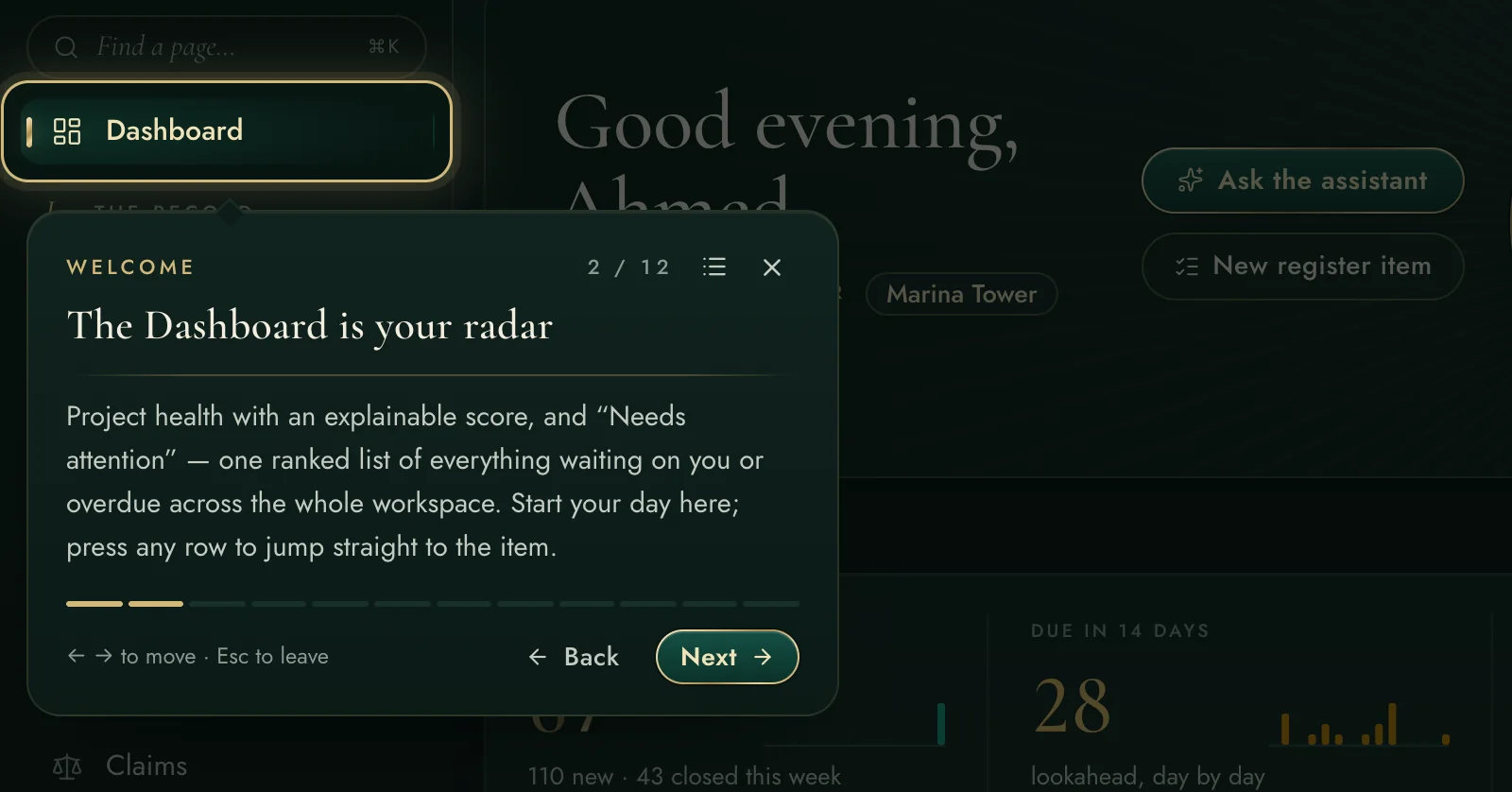
First sign-in opens a one-minute guided tour that walks the real navigation, role-aware. Behind it: a full manual, exact how-to hints on every settings card, and a living demo project to practise on safely.

See the assistant & AI accounts →
The first-login guided tour
One workspace. One annual price. Unlimited engineers.
No per-seat cloud bill, no per-module unlock, no charge for the calculators or the studios. Pricing conversations start at the trial — after you have seen it on your own project.
Free 15-day trial · full product

Try the live app — free for 15 days.

Request a trial and we create you a personal account on a live workspace — inside a realistic demo project with drawings, registers, workflows and claims already moving. Every trial is approved by a person; once approved, your sign-in details arrive by e-mail, usually within a day.

15 days, the full product — every pillar, no cut-down demo build
Your trial lives in a realistic demo project; it cannot touch anyone's live data
Sign-in details arrive by e-mail after approval — with the guided tour waiting on first login
Want AI tasks too? Paste your own AI key inside the app — you control the cost

Already have an account? Open the app →

Request received. A real person reviews every trial — once approved, your sign-in details and trial dates arrive by e-mail, usually within a day.

By requesting a trial you agree we contact you about it. Trial accounts are demo-scoped and may be closed at any time. No spam, ever.